What Makes a CV High-Converting?
A highly converting CV is not just visually appealing — it is strategically structured to guide the recruiter's attention, highlight your value quickly, and pass Applicant Tracking System (ATS) screening without issues.
Additionally, ATS compatibility plays a critical role. Clean formatting, standard fonts, clear headings, and keyword-optimized content ensure your CV is readable by automated systems used by most employers today.
Finally, a converting CV is tailored to the role and industry. It aligns design, language, and structure with employer expectations, making it easier for recruiters to see the fit between your profile and the position.

Professional CV Template Styles
Choose the right template style based on your industry, experience level, and target role
Classic Professional
Key Features:
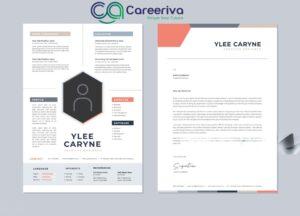
- Two-column layout with sidebar
- Skills and certifications in sidebar
- Experience and education in main area
- Clean typography with subtle separators
Why It Converts:
The sidebar keeps key information visible at a glance while the two-column layout maximizes space efficiency. Recruiters can quickly scan your summary and experience while seeing your skills clearly highlighted.
Best For:
- Corporate roles (finance, consulting, management)
- Mid-to-senior professionals
- Candidates with solid, relevant experience
Modern / Creative
Key Features:
- Bold heading for name and title
- Visual skill bars or icons
- Clean section headings with color accents
- Infographic-style timeline for work history
Why It Converts:
Visual elements make your strengths tangible and memorable. The timeline-style experience clearly shows progression, while modern design suggests you're current and forward-thinking.
Best For:
- Creative roles (marketing, design, media)
- Start-up companies
- Candidates emphasizing design sense
Minimalist ATS-Friendly
Key Features:
- Single-column layout
- No graphics, icons, or complex columns
- Simple headings and bullet points
- Standard fonts (Arial, Calibri, Times New Roman)
Why It Converts:
ATS systems read this template without any issues. The clean format means nothing distracts from your content, ensuring high readability for both software and recruiters.
Best For:
- Large corporations with ATS screening
- Roles where keyword matching matters
- Graduates with concise experience
Hybrid Skills + Experience
Key Features:
- Skills summary section at top
- Professional experience below
- Highlighted projects under each job
- Separate certifications and tools section
Why It Converts:
Immediately showcases what you're good at before diving into experience. For technical or project-based roles, this lets recruiters see your capabilities quickly while adding credibility through achievements.
Best For:
- Technical roles (IT, software, engineering)
- Freelancers with project history
- Highlighting both skills and results
Executive Leadership
Key Features:
- Executive summary at the top
- Key achievements and metrics highlighted
- Board memberships and speaking engagements
- Strategic leadership competencies section
Why It Converts:
Emphasizes strategic impact and leadership achievements. The format showcases high-level accomplishments and demonstrates the breadth of executive experience that C-suite recruiters look for.
Best For:
- C-level executives and senior leadership
- Board member positions
- Candidates with 15+ years experience
Tips for Selecting a High-Converting Template
Essential guidelines to help you choose and customize the perfect CV template
Align with Your Industry
Use a template that matches your field. Technical and creative roles benefit from different styles — choose accordingly to meet industry expectations.
Prioritize Readability
A pretty CV that's hard to scan won't help. Ensure your template is clean enough for both human recruiters and ATS systems to process easily.
Content First, Design Second
Even the best template won't help if your achievements are weak. Focus on strong, quantified accomplishments before worrying about aesthetics.
Customize for Each Application
Use a flexible template that lets you reorder sections. For example, move "Skills" up if the role demands strong technical ability.
Test with ATS
Export your CV to plain text or use a free ATS-check tool. If the structure breaks, you might need a simpler format to ensure compatibility.
Work Smart, Not Just Good
High-converting templates highlight your value clearly, match how recruiters read, and support both ATS scanning and human review effectively.
Ready to Create Your High-Converting CV?
Let Careeriva help you build a professional CV that gets noticed by recruiters and passes ATS screening. Our expert team will craft a template optimized for your industry and experience level.